
How to Use Claude for Literature Reviews Without Fake Citations
By Ashley Gross
·
·
Claude

Ask AI to write a literature review from memory and you get invented citations, blended sample populations, and statistics nobody published. The fix is not a better prompt. It's a better setup.
Give Claude the actual papers, make it extract before it summarizes, and make it prove every claim with a quote and a page number. This workflow does that in six steps, and it ends with references you can import into your citation manager.
What You Need
Plan level: Any Claude plan. Projects are available on free accounts, with a cap of five projects. Paid plans give a project more room for large PDF collections.
Input files: Your primary research papers as PDFs, 30MB or smaller per file.
Time: 30 to 45 minutes.
About the screenshots: The five studies shown below are sample documents we created for this walkthrough, and each one is labeled as a sample. The data is illustrative. The workflow and Claude's responses are real.
Step-by-Step Walkthrough
1. Upload Your PDFs to a Dedicated Project
Don't ask Claude to recall studies from its training. Open Projects, click New project, and give it a name and a one-line goal. Then find the Context panel on the right side of the project and add your PDFs there. Every chat you start inside the project can read those files.
Two limits to know. Project files max out at 30MB each. Claude reads charts and images in PDFs up to 100 pages, and reads text only in longer ones.
Why it matters: Real files give Claude real text to quote, and they give you something to check it against.

2. Extract Data Into a Standard Table
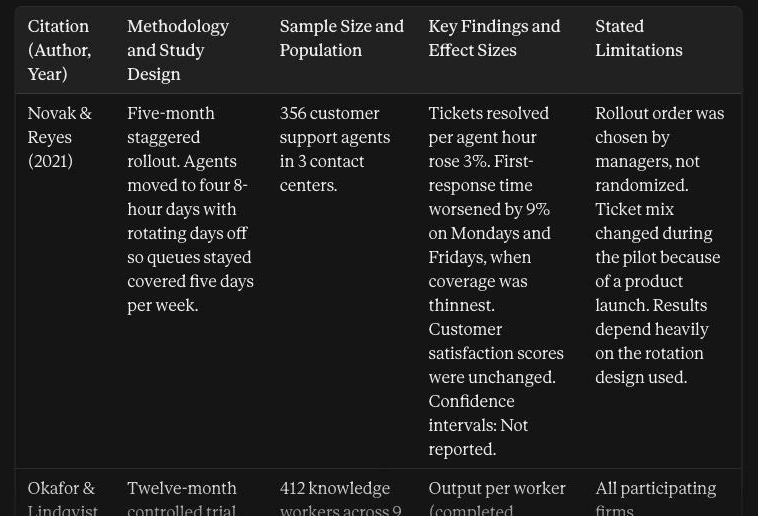
Start a chat inside the project and ask for an extraction table before you ask for any conclusions. Name the exact columns you want. Tell Claude what to write when a paper doesn't report something, so it has an alternative to guessing.
Why it matters: Every paper is structured differently. One table puts them side by side, which makes the methods comparable.
3. Synthesize Themes Across the Papers
Now ask for a synthesis built on that table. State your research question in the prompt, and ask Claude to group findings by theme instead of walking through the papers one at a time.
Why it matters: A paper-by-paper summary is a list. A thematic synthesis is an argument, and that's what a policy, healthcare, or executive review needs.

4. Explain Contradictory Findings
When studies disagree, a generic prompt averages them into a vague consensus. Ask for the opposite. Have Claude line up the conflicting studies and compare who was studied, for how long, and under what design.
Why it matters: The reason two studies conflict is usually the most useful finding in the review. It tells you where an intervention works and where it doesn't.

5. Audit Every Claim Against the Source Text
Run an audit before anything leaves the project. Ask Claude to quote the exact sentence and page number behind every claim in the synthesis. Paste in sentences from your own draft and audit those too.
Then spot-check the quotes yourself. Open the PDF, go to the page, and confirm the sentence is there. The audit narrows your checking to minutes. It doesn't replace it.
Why it matters: This is the step that catches a misattributed number before your reader does.

6. Export References to Your Citation Manager
Ask Claude for every study in BibTeX format. Copy the code block, save it as a .bib file, and import it into Zotero, EndNote, or Mendeley. Tell Claude to leave out any field the PDF doesn't state. That keeps it from inventing a DOI.
Why it matters: You skip the manual bibliography formatting and the typos that come with it.

Worked Example: Four-Day Work Week Productivity Review
We ran this exact workflow on five sample studies about the four-day work week. The studies are illustrative. What Claude did with them is the point.
The Extraction Table
Claude returned a five-row table covering trial design, sample, findings, and limitations. Samples ranged from 356 support agents to 2,940 production workers. Where a paper gave no confidence interval, Claude wrote "Not reported" and did not fill the gap.
Explaining the Contradiction
Two studies pointed in opposite directions:
Okafor and Lindqvist (2022): a 12% gain in output per worker.
Marchetti (2023): a 5% decline in units per labor hour.
Claude did not split the difference. It showed that the two studies tested different things. The first followed 412 knowledge workers on a 32-hour week with meetings cut by about a third. The second followed 2,940 production workers whose 40 hours were compressed into four 10-hour shifts, with no workflow changes. Fewer hours and compressed hours are not the same intervention.
What the Audit Caught
We planted one bad sentence in the audit: "Employee retention rose by 40% (Tanaka and Brennan, 2023)." Claude marked it UNVERIFIED. The source says the share of employees reporting high burnout dropped by 40%. Voluntary turnover dropped by 18%, and retention was never measured directly.
It also audited itself. Of 24 claims checked, Claude verified 13 and flagged 11, most of them interpretive leaps in its own synthesis. One example: it had grouped a customer support study under "reduced hours with the same pay," and the source states neither total hours nor pay.
The Reference Export
Claude produced a five-entry BibTeX block with authors, titles, journals, volumes, and pages. It included no DOIs, because none of the PDFs stated one.
Common Mistakes
Asking Claude to recall studies from memory: No PDFs means generated paper titles, invented author names, and fabricated DOIs.
Smoothing over contradictory findings: A forced consensus hides why an intervention succeeds in one setting and fails in another.
Skipping the citation audit: A fluent synthesis can still carry a wrong number. In our run, the audit flagged 11 of 24 claims.
Treating the audit as the final check: Open the PDFs and confirm the quoted sentences yourself before you publish.
Take It Further
Make Claude argue against its own work. Ask: "Act as a skeptical journal reviewer. Identify three weak conclusions, unaddressed methodological gaps, or missing control variables in this synthesis, based on the PDFs in this project." Fix what it finds before your review goes to peer review or an executive audience.
A literature review you can defend comes down to three moves: real files, a structured extraction, and an audit of every claim. Create a Claude Project, upload your papers, and run the extraction prompt first.